✦ Custom dashboards · built and kept current for you

See every marketing dollar
without the spreadsheet shuffle.

We turn your scattered ad-platform exports into one clear dashboard for your team: cross-channel performance, budget pacing, and AI-style insights on what to do next. Refreshed for you every week.

Click through the real dashboard with sample data, no signup.
WalmartAmazonInstacartTarget RoundelAlbertsons / AcmeGoogle AdsMeta+ your sources
▶ Open the live demo
The problem

Your data lives in seven exports.
Your decisions shouldn't.

Every platform reports differently, on its own attribution and calendar. Teams lose days stitching spreadsheets and still can't answer "where should the next dollar go?"

⧉

Scattered reporting

Walmart, Amazon, Instacart, Google and Meta all export different columns, windows and definitions.

⏱

Hours of manual work

Someone rebuilds the same spreadsheet every month instead of planning.

?

No clear next step

Dashboards show what happened. Few tell you what to change, and by how much.

What you get

One dashboard. Every channel. Clear next moves.

Built around your channels, products and fiscal calendar. No logins to manage: it's a single fast file your whole team can open.

Cross-channel performance in one view

Spend, attributed sales, ROAS, CPC and new-to-brand across every platform, with year-over-year comparisons that line up.

  • Search vs. display & social, side by side
  • Filter by channel, month, or custom date range
  • Top SKUs by channel, mapped to your product catalog
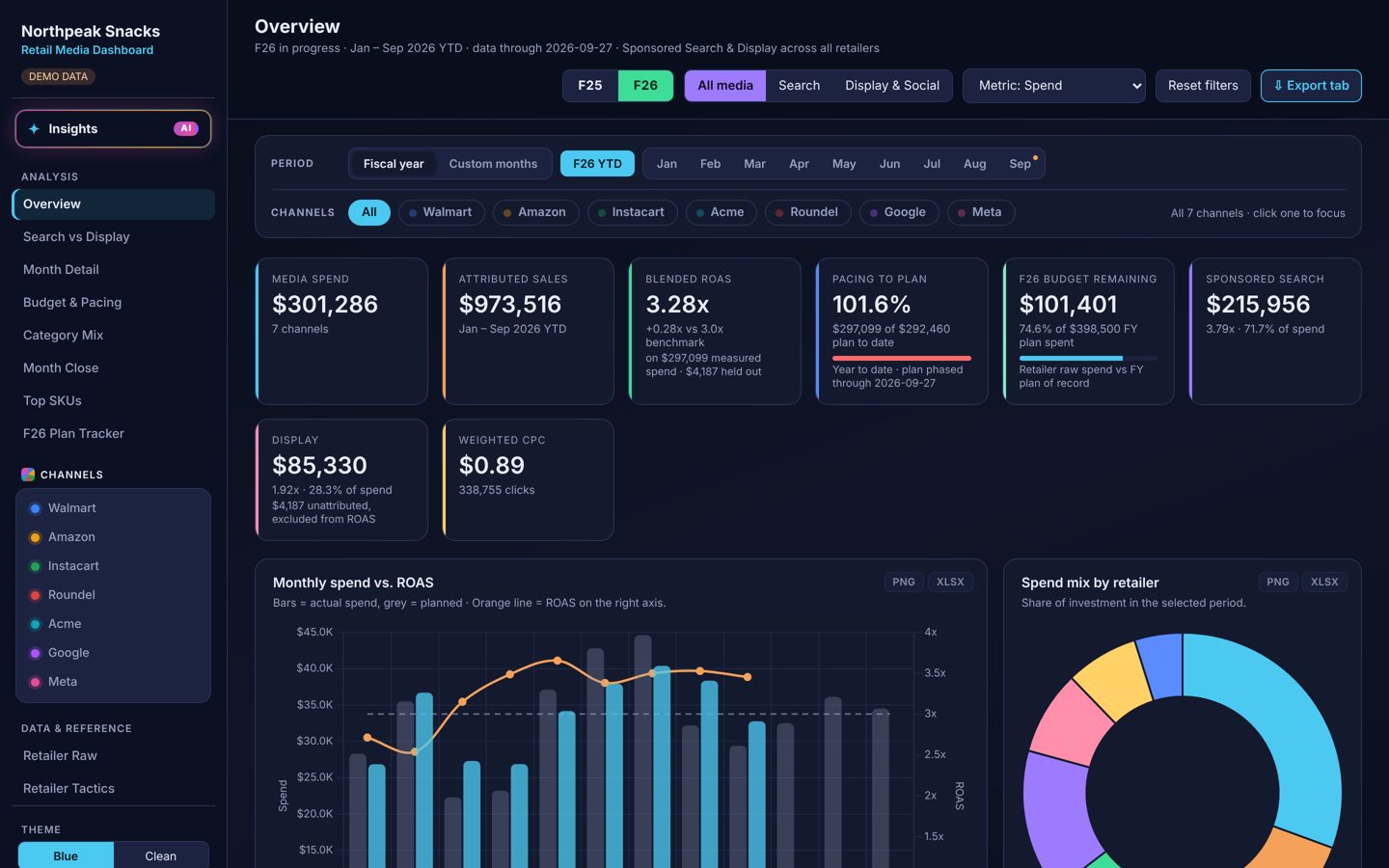
Overview tab
✦ Insights

Recommendations you can act on

The Insights tab reads all of your performance data and suggests what to do next, with the evidence and the estimated impact.

  • Budget shifts toward channels with the best marginal return
  • Underperformers diagnosed: cost problem or conversion problem
  • Hero SKUs, best months, and untested tactics worth trying
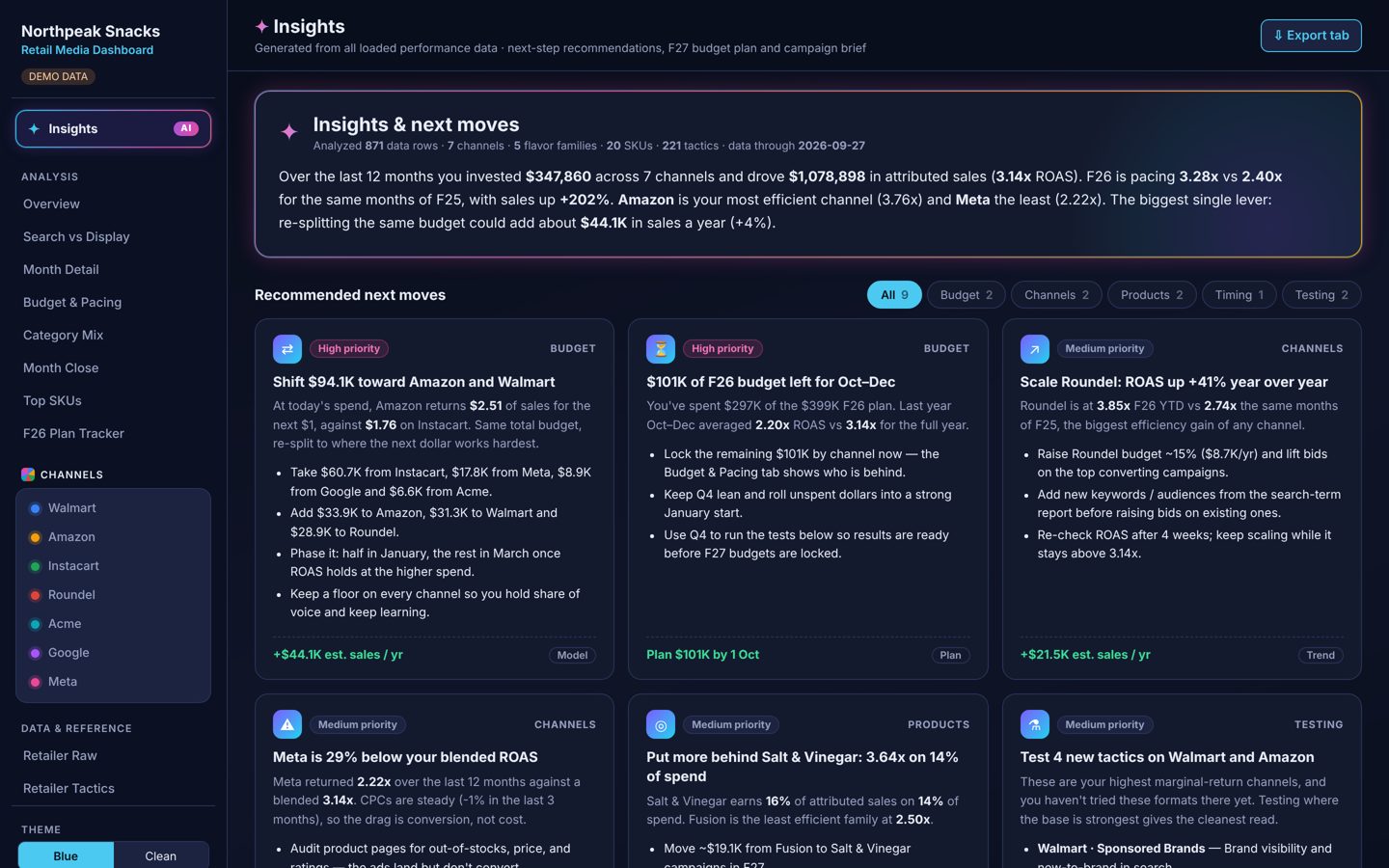
Insights tab with recommended next moves

Next-year budget planner & campaign builder

Set a total budget and a goal. The planner splits it by channel, month and quarter, and shows the projected lift. The campaign builder drafts a brief for your next launch.

  • Max sales, balanced, or new-to-brand goals
  • Guardrails on how far each channel can move
  • Exports to Excel and PNG for decks and finance
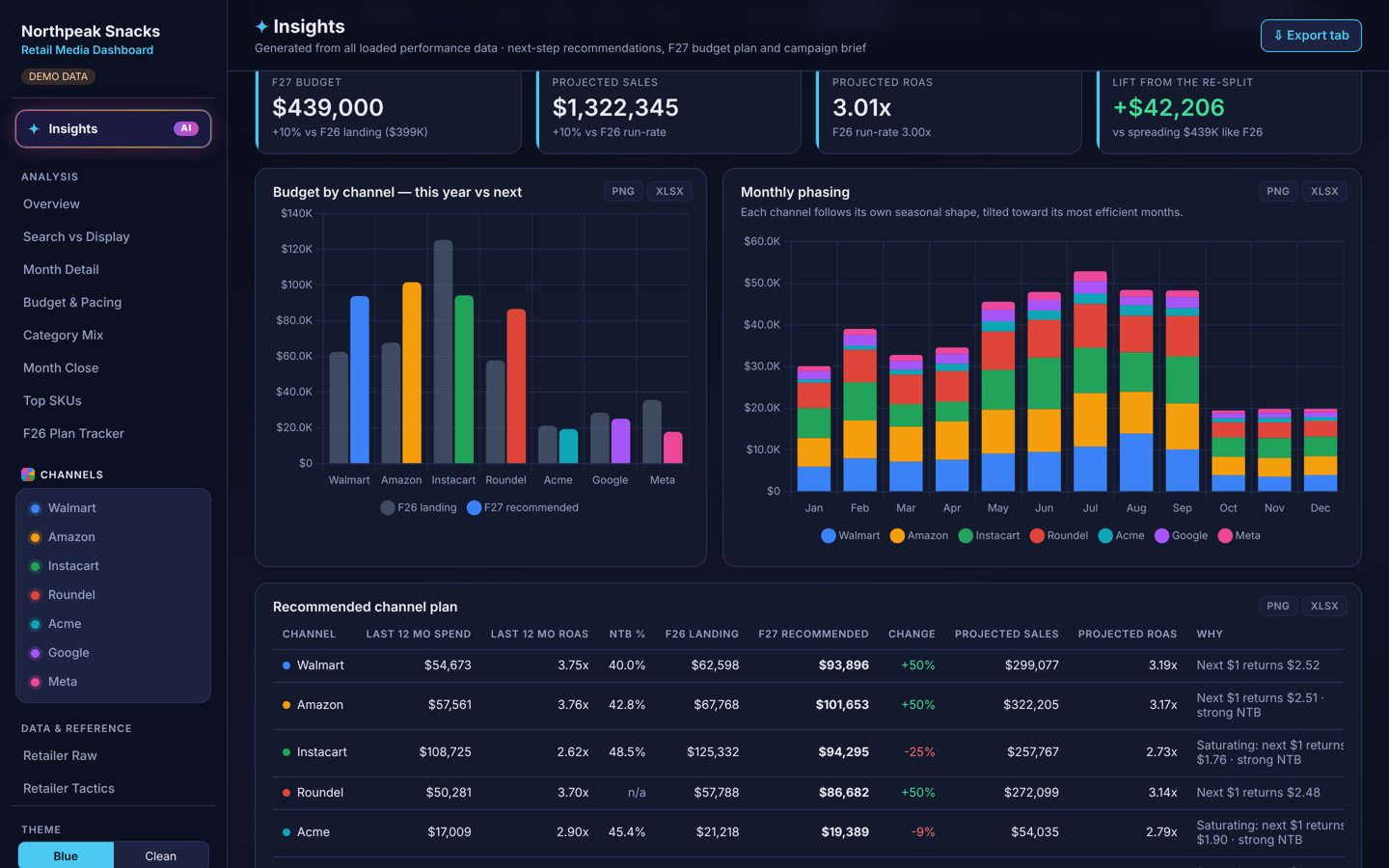
Budget planner

Plan tracking, pacing and a tactics library

See where every channel sits against plan, and browse 200+ researched ad tactics per platform, marked with what you've already tested and how it performed.

  • Budget pacing and month-close views
  • Every chart and table exports to Excel or PNG
  • Light and dark themes for screens and slides
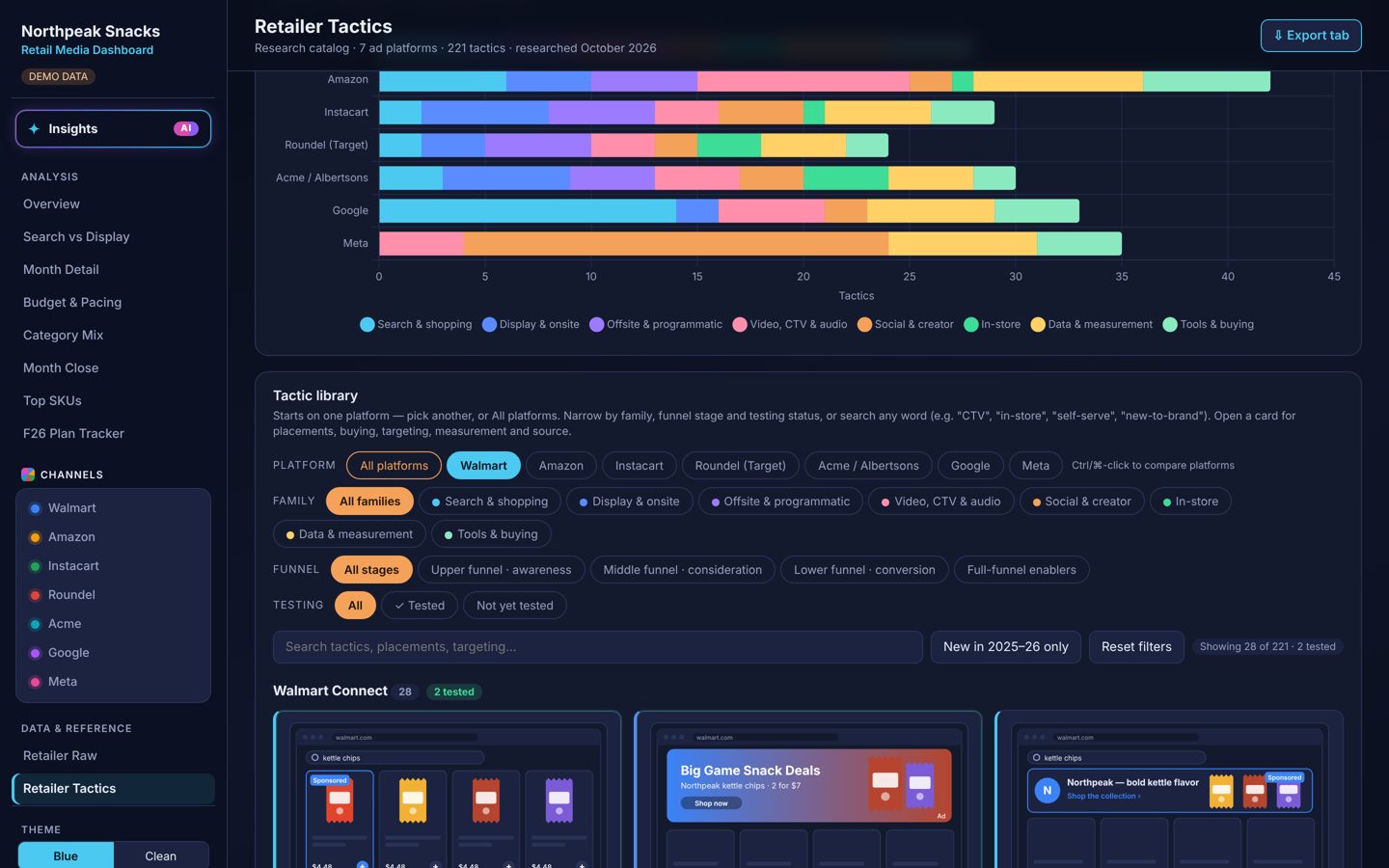
Retailer tactics library
Built for

Retail media is where we started.
Any marketing team can use it.

Every dashboard is custom. Bring the sources your team actually uses.

🛒

Retail media & CPG

Walmart Connect, Amazon Ads, Instacart, Roundel, Albertsons and more, by retailer and SKU.

📣

Paid social & search

Google, Meta, TikTok and others, with pacing and creative-level views.

🛍

E-commerce brands

Shopify and marketplace sales alongside ad spend for true blended ROAS.

👥

Sales & account teams

Performance by account or rep, so every owner sees their numbers.

How it works

Done for you, start to finish

You keep running campaigns. We handle the data, the dashboard and the weekly refresh.

Intro call

We learn your channels, products, fiscal calendar and the questions you need answered.

Send your exports

Share the standard reports from each platform, or give us read-only access.

We build your dashboard

Your branding, your channels, your plan, reviewed with you before it goes live.

Weekly refresh

Fresh data every week, plus a monthly readout of the top moves to make next.

Plans

Start with a build. Stay for the insights.

Pricing depends on how many channels and sources you have. We'll scope it on a quick call.

Dashboard Build

One-time setup
  • Custom dashboard for your channels
  • Product catalog & campaign mapping
  • Your fiscal calendar and plan
  • Team walkthrough
Talk to us
MOST POPULAR

Weekly Pulse

Build + weekly updates + monthly insights
  • Everything in Build
  • Weekly data refresh
  • Monthly insights readout: top next moves
  • Pacing check against plan
  • Small tweaks and new views
Book a call

Annual Planning

Add-on for budget season
  • Next fiscal year budget plan
  • Channel and monthly phasing
  • Campaign briefs per product line
  • Planning session with your team
Talk to us
🔒

Your data stays in your file

Dashboards run entirely in the browser. No third-party BI logins, nothing streamed to outside servers.

📝

NDA on request

We're happy to sign your NDA before you share a single export.

⚡

Nothing to install

One file that opens in any browser. Forward it to a buyer, a rep or your CFO.

FAQ

Questions brands ask

Which platforms can you include?

Anything that exports a report: Walmart Connect, Amazon Ads, Instacart, Roundel, Albertsons Media Collective, Kroger, Google Ads, Meta, TikTok, Shopify, and more. If you can download it, we can usually map it.

Is the demo real data?

No. The demo uses a fictional snack brand with generated data, so you can click through every view without seeing anyone's real numbers.

Do we need to give you account access?

No. Most clients email or share their weekly exports. Read-only access is an option if you'd rather we pull them. We can also set up automatic scheduled exports or direct API connections to your ad platforms, so your data flows in without anyone downloading reports.

How are the insights generated?

From your own performance data: efficiency by channel, diminishing returns as spend grows, seasonality, SKU results and your test history. They're directional recommendations to plan with, and we walk through them with you.

Can it match our brand and fiscal calendar?

Yes. Your logo, colors, fiscal year, plan budgets and naming conventions are all built in.

Book a call

See it with your own channels

A 20-minute call: we'll walk through the demo, look at the channels you run, and tell you what your dashboard would include.

  • ✦ Live walkthrough of the demo
  • ✦ Which views fit your team
  • ✦ Scope and pricing for your setup
Thanks! Your email app should open with the request ready to send. If it didn't, email us at .